
Power BI Model.MaxParallelismPerQuery: A Complete Guide to DirectQuery Parallelisation
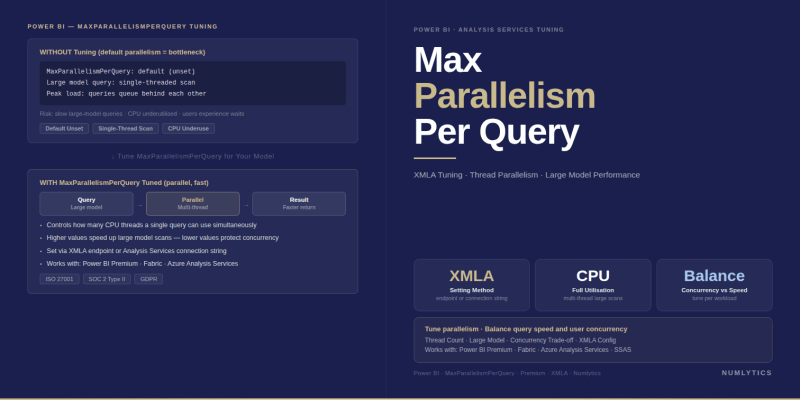
Power BI DirectQuery parallelisation via Model.MaxParallelismPerQuery configure SE query concurrency to fully utilise cloud data warehouse capacity.
DirectQuery datasets in Power BI expose a performance characteristic that Import mode datasets do not: every visual interaction on a report page generates one or more live SQL queries against the underlying data source. For organisations connecting Power BI to cloud-scale data warehouses Snowflake, Azure Synapse Analytics, Google BigQuery, Databricks the compute capacity on those platforms is designed to handle high levels of concurrent query execution. The question is whether Power BI's analytical engine is configured to take full advantage of that parallelism.Power BI MaxParallelismPerQuery is the specific model-level setting that controls this, and understanding it correctly is the difference between a DirectQuery dataset that performs well at scale and one that artificially throttles itself against a warehouse that could handle significantly more.
Why DirectQuery Performance Is a Governance Problem, Not Just a Developer Problem
When a Power BI report built on a DirectQuery semantic model renders slowly, the instinctive response is to optimise the DAX measures or the underlying SQL views. Both are legitimate interventions but they address the content of the queries, not the concurrency model under which those queries execute. A well-written DAX measure that generates an efficient SQL statement will still perform below its potential if the engine is serialising SE sub-queries that could run in parallel against a warehouse with available compute threads.
For organisations operating Power BI at enterprise scale where DirectQuery datasets serve executive dashboards, financial reporting, or operational monitoring applications parallelisation configuration is a governance-layer decision. It belongs in the standard semantic model configuration checklist for any DirectQuery deployment against a cloud data warehouse, not as an afterthought applied after performance complaints surface.
"Cloud data warehouses are built for massively parallel query execution. A DirectQuery Power BI dataset configured with default parallelism is making only a fraction of that infrastructure available to report users the rest is waiting to be unlocked through a single model property."
Understanding the Storage Engine and Formula Engine Split
To understand what Power BI MaxParallelismPerQuery controls, it helps to understand the two-component query architecture of Analysis Services Tabular the engine that underlies Power BI semantic models.
When a DAX query executes, it is processed by two distinct components. The Formula Engine (FE) is the orchestration layer it receives the DAX query, builds an execution plan, and coordinates the retrieval and aggregation of data. The Storage Engine (SE) is the data retrieval layer it executes the actual data scans or, in DirectQuery mode, translates the retrieval requests into native SQL queries and submits them to the underlying data source.
A single DAX query can generate multiple SE sub-queries. In Import mode, these SE sub-queries scan the in-memory VertiPaq column store and are naturally parallelised across available CPU threads. In DirectQuery mode, each SE sub-query becomes a SQL statement submitted to the external data source. The MaxParallelismPerQuery property governs how many of these SE sub-queries a single DAX query is permitted to submit to the external source concurrently, rather than sequentially.
What Model.MaxParallelismPerQuery Controls
Model.MaxParallelismPerQuery is a model-level property in the Analysis Services Tabular Object Model (TOM) that sets the maximum number of Storage Engine queries a single DAX query can execute in parallel against the external data source. It applies to DirectQuery datasets at compatibility level 1569 or higher and affects all DirectQuery connections defined within the model.
When a complex DAX measure such as a calculation involving multiple CALCULATE expressions, DIVIDE with a conditional, or a time intelligence measure that generates several sub-queries executes against a DirectQuery source, the FE generates multiple SE requests. With the default setting, those requests execute sequentially: SE sub-query 1 completes, then SE sub-query 2 begins, and so on. Raising MaxParallelismPerQuery allows some or all of those SE sub-queries to execute simultaneously, reducing the wall-clock duration of the overall DAX query execution on reports where the data source has available concurrency capacity.
Default Behaviour and Why It Exists
The default value for Model.MaxParallelismPerQuery is 1, which effectively disables SE query parallelisation for individual DAX queries and forces serial execution of all SE sub-queries. This conservative default exists for two reasons.
First, during the feature's preview period, the behaviour of parallel SE queries against a wide variety of external data sources needed validation before a more aggressive default could be set safely. Different data source types cloud warehouses, on-premises SQL Server, Oracle, SAP HANA have different concurrency models, connection pooling behaviours, and resource governance configurations. A default of 1 prevents the feature from inadvertently generating unexpected load patterns on data sources that had not been configured to handle them.
Second, parallel SE execution is not universally beneficial. Against an on-premises SQL Server with limited connection concurrency, or a source system under high concurrent load, raising MaxParallelismPerQuery can increase contention rather than reduce query duration. The default of 1 ensures that organisations explicitly opt into parallelism after assessing their source system's capacity, rather than having it applied automatically.
How to Configure MaxParallelismPerQuery via TOM
Model.MaxParallelismPerQuery can only be configured programmatically through the Tabular Object Model (TOM) or Tabular Model Scripting Language (TMSL) it is not exposed in the Power BI Desktop model properties UI. The following C# snippet demonstrates the complete configuration pattern using the Analysis Services Tabular client library.
using TOM = Microsoft.AnalysisServices.Tabular;

partial class Program
{
    static void Main(string[] args)
    {
        using (var server = new TOM.Server())
        {
            string workspaceUrl = "<URL to workspace>";
            string databaseName = "<database name>";

            // Connect to the Power BI Premium/Fabric workspace via XMLA endpoint
            server.Connect(workspaceUrl);

            TOM.Database database = server.Databases.FindByName(databaseName);
            if (database == null)
            {
                throw new ApplicationException("Database cannot be found!");
            }

            // Ensure the model is at compatibility level 1569 or higher
            if (database.CompatibilityLevel < 1569)
            {
                database.CompatibilityLevel = 1569;
                database.Update();
            }

            TOM.Model model = database.Model;

            // Set the maximum number of parallel SE queries per DAX query.
            // Default is 1 (serial). Raise for cloud DW sources with available concurrency.
            model.MaxParallelismPerQuery = 10;

            model.SaveChanges();
        }

        Console.WriteLine("\nDone! Press any key to exit.");
        Console.Read();
    }
}
Prerequisites for Running This Configuration
To execute the code above against a Power BI dataset, the following prerequisites must be met. The workspace must be assigned to a Power BI Premium capacity or a Microsoft Fabric capacity XMLA read/write endpoints are a Premium/Fabric feature and are not available on shared capacity. The XMLA endpoint for the workspace must have read/write access enabled, configured in the workspace settings under Advanced. The executing identity service principal or user account must have Contributor or higher permissions on the workspace. The Microsoft.AnalysisServices.Tabular NuGet package must be referenced in the project.
The workspaceUrl parameter takes the XMLA endpoint URL format, which follows the pattern powerbi://api.powerbi.com/v1.0/myorg/[WorkspaceName] and can be found in the workspace settings under Premium in the Power BI Service.
Compatibility Level Requirements
The MaxParallelismPerQuery property is available at compatibility level 1569 or higher. The code snippet above includes a guard check that upgrades the model to compatibility level 1569 if it is currently below that threshold. Compatibility level upgrades are irreversible a model upgraded to 1569 cannot be downgraded so this step should be performed in a development or test workspace before applying to production.
For models already at a higher compatibility level (1600 or above, which applies to models created in newer versions of Power BI Desktop), no compatibility level change is required the property is simply set and saved directly.
When to Raise the Value and When Not To
Raise MaxParallelismPerQuery when the DirectQuery data source is a cloud-scale data warehouse Snowflake, Azure Synapse Analytics Dedicated SQL Pool, BigQuery, Databricks SQL Warehouse, or Azure Synapse Serverless that is provisioned with significant compute concurrency. These platforms are specifically designed to process large numbers of simultaneous queries, and serial SE execution from Power BI artificially under-utilises that capacity. Values between 5 and 10 are a reasonable starting range; the optimal value depends on the warehouse's concurrency limits, the complexity of the DAX measures in the model, and the number of concurrent report users generating queries simultaneously.
Do not raise MaxParallelismPerQuery against on-premises SQL Server instances, shared database servers with limited connection pool capacity, or any source system where the connection concurrency is constrained by licensing or resource governance configuration. In these environments, raising the parallelism value increases connection pressure rather than reducing query duration, and can degrade performance for all consumers of the source database not just the Power BI dataset.
After changing the value, validate the impact using DAX Studio's Server Timings trace or the Performance Analyzer in Power BI Desktop. The key metrics to observe are SE query count, SE query duration per query, and total DAX query duration. A successful parallelism increase will show individual SE query durations remaining similar while the total DAX query duration decreases because previously serial sub-queries are now completing concurrently.
MaxParallelismPerQuery Value Guide
| Value | Behaviour | Recommended For | Avoid When |
|---|---|---|---|
| 1 (default) | Serial SE execution all sub-queries run sequentially | On-premises sources; sources with limited concurrency; initial deployment default | Never ideal for cloud DW; use only where source concurrency is constrained |
| 2–4 | Low parallelism — modest concurrency gain with minimal source pressure | Mid-tier cloud databases; sources with moderate connection pool capacity | High-concurrency cloud DW where higher values would deliver more gain |
| 5–10 | Moderate-to-high parallelism-material reduction in complex DAX query duration | Snowflake,Azure Synapse,BigQuery,Databricks with available compute concurrency | On-premises-SQL-Server;shared-databases;sources-with tight connection limits |
| 10+ | Aggressive parallelism-maximum throughput for complex models | Dedicated-high-concurrency warehouses with validated capacity headroom | Any source without explicit concurrency-capacity testing and monitoring |
- Model.MaxParallelismPerQuery controls how many Storage Engine sub-queries a single DAX query can execute in parallel against a DirectQuery data source the default of 1 forces serial execution.
- The property is only configurable via TOM or TMSL it is not exposed in the Power BI Desktop UI and requires XMLA read/write access on a Premium or Fabric capacity workspace.
- Compatibility level 1569 or higher is required; the TOM code should include a guard check and the upgrade step should be validated in a development workspace first, as compatibility upgrades are irreversible.
- Cloud-scale data warehouses (Snowflake, Azure Synapse, BigQuery, Databricks) are the primary use case they are provisioned for high concurrency and benefit significantly from raised parallelism values.
- Raising the value against on-premises or connection-constrained sources increases contention rather than reducing duration test the impact with DAX Studio Server Timings before applying to production.
- Values of 5–10 are the typical effective range for cloud DW sources; validate by comparing SE query duration and total DAX query duration before and after the change.
Next Steps for DirectQuery Performance Optimisation
Power BI MaxParallelismPerQuery is one lever in a broader DirectQuery performance optimisation toolkit. Parallelism configuration addresses SE sub-query concurrency; it does not address FE inefficiency from poorly structured DAX, nor does it compensate for missing indexes or poorly partitioned tables in the source warehouse. A complete DirectQuery optimisation approach combines parallelism configuration with DAX measure review using DAX Studio, source query optimisation using the DirectQuery query log, and where appropriate, the introduction of aggregation tables that route the majority of interactive queries to Import-mode aggregates while preserving DirectQuery for transaction-level drill-through.
For organisations managing DirectQuery deployments at enterprise scale across multiple workspaces, business units, or geographies standardising the MaxParallelismPerQuery configuration as part of the semantic model deployment checklist is a straightforward governance improvement. It ensures that all production DirectQuery models against cloud data warehouse sources are deployed with consistent and intentional parallelism configuration, rather than leaving each model at the conservative default. To discuss how this fits into a broader Power BI performance governance programme for your organisation, speak with a certified Power BI consultant at Numlytics.
For a related look at capacity-level performance controls managing CPU spikes and throttling on the Power BI Premium capacity that hosts these DirectQuery datasets see our companion post on managing CPU spikes on Power BI Premium capacity.