
Salesforce to Microsoft Fabric: The Enterprise Migration Guide
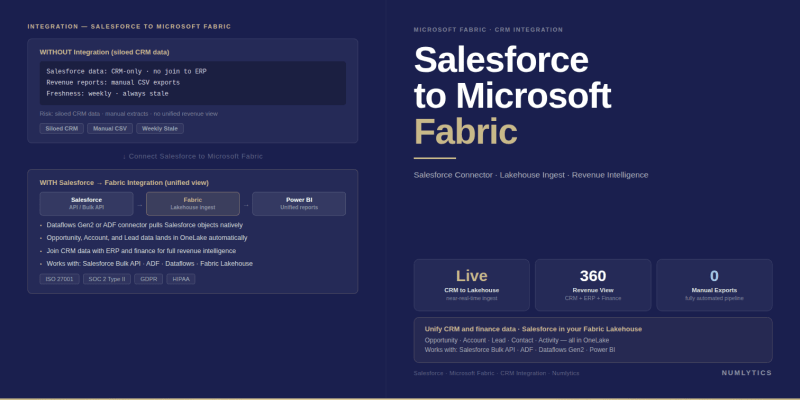
Salesforce to Microsoft Fabric - bring CRM data into your unified analytics estate without rebuilding reports.
Salesforce holds the commercial heartbeat of most enterprises - pipeline data, customer history, opportunity stages, contract values. Yet for the vast majority of organisations, that data sits in a walled garden: accessible for CRM workflows, but disconnected from the financial, operational, and supply chain data that leadership actually needs for unified decision-making. The move from Salesforce to Microsoft Fabric is the architectural decision that breaks that wall down.
The CRM Data Problem Executives Cannot Ignore
The cost of CRM data isolation is not immediately obvious on a balance sheet, but it surfaces in predictable ways. Sales forecasting models built solely on Salesforce data lack the margin and fulfilment context that finance holds. Revenue attribution analyses require manual joins between CRM exports and ERP data that take days to produce and are stale by the time they reach the boardroom. Customer churn models that do not incorporate service ticket history from systems outside Salesforce are structurally incomplete.
The organisational response to this problem has historically been to build point-to-point integrations: a Salesforce-to-SQL extract here, a CSV handoff to the finance team there. These integrations accumulate technical debt rapidly, are brittle under schema changes, and create the very data silos they were meant to solve. What enterprise data teams need is a governed, scalable integration layer and that is precisely the problem Microsoft Fabric is built to address.
"Moving Salesforce data to Microsoft Fabric is not a technical migration - it is a strategic decision to give revenue data the same analytical treatment as every other enterprise data domain."
Why Microsoft Fabric Is the Right Destination for Salesforce Data
Microsoft Fabric provides a unified analytics platform built on OneLake a single logical data lake that eliminates the need for data movement between storage layers. When Salesforce data lands in OneLake, it becomes immediately available to every Fabric workload: Spark notebooks for data science, Warehouse and Lakehouse items for SQL analytics, Power BI semantic models for reporting, and Real-Time Intelligence for event-driven use cases.
The alternative routing Salesforce data through a standalone Azure Data Lake or Synapse Analytics workspace introduces additional orchestration overhead and increases the complexity of access management. Fabric's integrated security model, which inherits from Microsoft Entra ID and applies consistently across all workloads, simplifies governance significantly for organisations with Salesforce data subject to contractual or regulatory handling requirements.
For organisations already running Power BI for reporting, the path from Salesforce to Microsoft Fabric is particularly compelling. Salesforce opportunity and account data brought into a Fabric Lakehouse becomes a first-class semantic model input alongside ERP, finance, and HR data enabling the cross-domain reporting that executive dashboards have always promised but rarely delivered.
Salesforce to Microsoft Fabric: Integration Options Compared
There is no single correct method for connecting Salesforce to Fabric. The right choice depends on data volume, refresh frequency, transformation complexity, and whether the organisation already has Fabric capacity provisioned. The table below maps the main approaches against their practical trade-offs.
| Integration Method | Best For | Refresh Cadence | Transformation Support | Complexity |
|---|---|---|---|---|
| Dataflow Gen2 (native connector) | Low-to-medium volume, Power Query familiarity | Scheduled (hourly minimum) | Full Power Query M transformations | Low — no-code setup |
| Data Factory Pipeline + Salesforce connector | High-volume, enterprise-scale orchestration | Scheduled or event-triggered | Mapping data flows, Spark notebooks | Medium — requires pipeline authoring |
| Fabric Mirroring (where available) | Near-real-time replication use cases | Near-real-time (CDC-based) | Minimal — raw replication focus | Low — configuration-driven |
| Third-party ETL (Fivetran, Airbyte, etc.) | Orgs with existing ETL investments | Configurable (minutes to daily) | Varies by tool | Medium — depends on existing tooling |
| Salesforce Bulk API + Custom Notebook | Large data volumes, custom logic requirements | Scheduled batch | Full Python/Spark capability | High — requires engineering resource |
For most enterprise teams starting their Salesforce to Microsoft Fabric integration journey, Dataflow Gen2 provides the fastest path to a working pipeline. For teams managing Salesforce orgs with hundreds of thousands of records across multiple objects, Data Factory pipelines offer the orchestration robustness and monitoring capabilities that production-grade data engineering requires.
Using Dataflow Gen2 to Connect Salesforce to Fabric
Dataflow Gen2 in Microsoft Fabric includes a native Salesforce Objects connector that authenticates via OAuth and exposes Salesforce standard and custom objects through the Power Query interface. Setup is straightforward for any team with Power Query experience.
Configuring the Salesforce Connection
From within a Fabric workspace, create a new Dataflow Gen2 and select the Salesforce Objects connector from the data source catalogue. Authenticate using the Salesforce account credentials that hold API access a dedicated integration user with the appropriate Salesforce profile permissions is strongly recommended over using a named individual's credentials. Select the target Salesforce objects: Opportunity, Account, Contact, Lead, and any custom objects relevant to the reporting use case.
Apply Power Query transformations to normalise field names, cast data types, handle null values in currency and picklist fields, and filter out deleted or inactive records. Configure the data destination to write to a Lakehouse table in Delta format, this ensures the data is immediately available to both Spark notebooks and SQL analytics endpoints without additional conversion steps.
Incremental Refresh for Salesforce Objects
Salesforce objects expose a SystemModstamp field on most standard objects that records the last modified timestamp. Configure incremental refresh parameters in Dataflow Gen2 to filter on this field, loading only records modified since the previous run. For organisations with large Salesforce orgs 500,000 or more opportunity records, for example incremental refresh is not optional; it is a prerequisite for meeting any reasonable refresh SLA without consuming excessive Fabric capacity units.
Orchestrating at Scale With Data Factory Pipelines
When Salesforce data volumes or transformation complexity exceed what Dataflow Gen2 handles efficiently, Data Factory pipelines within Microsoft Fabric provide the enterprise orchestration layer. A standard pipeline architecture for Salesforce to Microsoft Fabric at scale follows a medallion pattern: raw Salesforce data lands in the bronze layer of OneLake, transformations are applied in a silver layer notebook, and business-ready aggregations are promoted to the gold layer for semantic model consumption.
The Copy Activity in Data Factory supports Salesforce as a source connector and writes directly to Lakehouse files or tables. For organisations running multiple Salesforce orgs a common scenario in post-acquisition environments the pipeline can be parameterised to iterate across org credentials and consolidate data into a unified OneLake structure under a consistent schema.
Pipeline monitoring through Fabric's monitoring hub provides visibility into run history, failure rates, and data volume per activity giving data engineering teams the operational observability they need to maintain SLA commitments for business-critical Salesforce reporting feeds.
Structuring Salesforce Data in OneLake for Analytics
How Salesforce data is structured in OneLake determines the quality of analytics it can support. A flat replication of Salesforce objects one table per object is a starting point, not an end state. The analytical value is realised when Salesforce entities are modelled in relation to one another and to data from other source systems.
The core entities for most CRM analytics use cases are Opportunity, Account, and OpportunityLineItem, joined on their standard Salesforce ID fields. Enriching this with User (for sales rep attribution), Territory (for regional segmentation), and custom objects specific to the organisation's sales process yields a semantic layer that can support pipeline reporting, win-rate analysis, customer lifetime value modelling, and cohort-based churn analysis - all from a single Fabric semantic model.
For organisations running cross-platform data migrations, aligning Salesforce account identifiers with customer keys from ERP and finance systems at the OneLake layer rather than at the reporting layer eliminates the reconciliation overhead that has historically made CRM-to-finance joins unreliable.
Governance and Security Considerations
Salesforce data frequently carries sensitivity classifications that require careful handling in the analytics environment. Personally identifiable information in Contact records, commercially sensitive data in Opportunity amounts and contract terms, and proprietary customer data in Account objects all require governance controls that survive the move from Salesforce to Fabric.
Microsoft Fabric's row-level security and column-level security capabilities, applied at the semantic model layer, allow data teams to restrict access to sensitive Salesforce fields, such as deal values or customer contact details without creating separate data extracts for different consumer groups. Microsoft Purview integration adds data classification and lineage tracking, enabling compliance teams to demonstrate which Salesforce fields are used in which reports and by which users.
For organisations subject to Salesforce contractual data handling requirements particularly those with enterprise agreements that specify data residency confirm that the Fabric capacity region aligns with those requirements before ingestion begins. Fabric's multi-geo capacity options support regional data residency constraints that a generic cloud data lake would require manual configuration to enforce.
- Salesforce to Microsoft Fabric integration eliminates CRM data silos and makes revenue data a first-class input into enterprise analytics alongside finance, ERP, and operational data.
- Dataflow Gen2 with the native Salesforce connector is the fastest path for low-to-medium volume use cases; Data Factory pipelines are required for enterprise-scale orchestration.
- Incremental refresh using SystemModstamp is essential for Salesforce orgs with large object volumes full refreshes are impractical at scale and consume capacity unnecessarily.
- Structuring Salesforce data in a medallion architecture within OneLake bronze ingestion, silver transformation, gold semantic layer produces analytics-ready data without point-to-point reporting hacks.
- Row-level and column-level security in Fabric semantic models preserve the access controls that governed Salesforce data without requiring separate data extracts per audience.
- Aligning Salesforce account identifiers with ERP customer keys at the OneLake layer not the report layer is the single most impactful modelling decision for CRM-to-finance reporting quality.
Next Steps for Your Salesforce Fabric Integration
The organisations that derive the most value from their Salesforce to Microsoft Fabric integration are those that treat it as a data product initiative rather than a technical plumbing exercise. The goal is not merely to replicate Salesforce data in Fabric - it is to produce a revenue analytics data product that the business can trust, consume, and build decisions upon.
A practical starting point is to identify the three to five Salesforce-dependent reports that your commercial leadership accesses most frequently, and map the data lineage required to produce them reliably from Fabric. In most organisations, this exercise surfaces both the integration requirements and the data quality gaps that have made CRM reporting unreliable in the past making it a diagnostic tool as much as a project scoping activity.
If your organisation is evaluating a broader cloud data platform migration that includes Salesforce alongside other source systems SAP, Workday, ServiceNow, NetSuite, a unified ingestion architecture in Fabric is considerably more cost-effective and governable than a collection of independent integration projects. Numlytics has delivered exactly this pattern for enterprise clients across financial services, professional services, and manufacturing sectors.
To discuss the right integration architecture for your Salesforce data and Power BI governance requirements, speak with a certified Microsoft Fabric consultant at Numlytics. We help data teams across the US, UK, Australia, and UAE design integration frameworks that deliver reliable, governed analytics from their CRM and operational systems.
For context on how similar migrations work with other enterprise platforms, see our guides on HubSpot to Microsoft Fabric and ServiceNow to Microsoft Fabric.