
Workday to Microsoft Fabric: A Practical Integration Guide for Data Executives
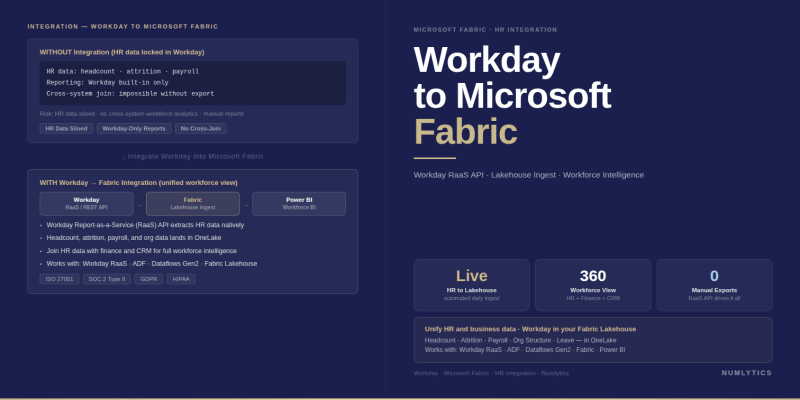
Workday to Microsoft Fabric - integrating HCM and Financial Management data into a unified enterprise analytics platform.
Workday holds some of the most consequential data an organisation produces headcount records, compensation structures, absence trends, performance ratings, financial planning figures, and payroll actuals that directly determine cost and capability. The operational reporting Workday provides is designed for transactional HR and Finance tasks, not for the cross-functional analytical questions that CHROs, CFOs, and CDOs need to answer at the executive level. Bringing Workday data into Microsoft Fabric closes that gap placing workforce and financial data into the same governed analytical layer as sales, operations, and customer sources, where it can drive the people analytics and integrated planning models that boardroom decisions depend on.
Why Workday Data Belongs in Microsoft Fabric
The strategic case for a Workday to Microsoft Fabric integration rests on a straightforward problem: workforce cost is typically the largest line item on the P&L, yet it is the most analytically isolated. Workday holds headcount, compensation, and absence data; the finance system holds budget actuals; the CRM holds revenue per account. Connecting these sources to model revenue per employee, cost per hire relative to productivity ramp, or attrition impact on project delivery capacity requires Workday data outside of Workday in a platform where it can be joined, modelled, and governed alongside every other enterprise dataset.
Microsoft Fabric's unified architecture OneLake storage, Data Factory pipelines, Spark-based transformation, and native Power BI consumption is purpose-built for exactly this consolidation. For organisations already operating in the Microsoft ecosystem, the governance alignment through Microsoft Purview, the identity integration with Azure Active Directory, and the direct connectivity to Power BI semantic models make Fabric the natural destination for Workday data rather than a standalone HR analytics platform or a disconnected data warehouse.
"Workforce data locked inside Workday is operationally useful but analytically incomplete. The moment it joins financial, sales, and operational data in Microsoft Fabric, it becomes strategically actionable."
The Workday Data Landscape: What You Are Actually Moving
Workday organises its data across two primary product areas Human Capital Management (HCM) and Financial Management each with distinct object models, update frequencies, and analytical value. Understanding what sits in each before designing the integration prevents the common failure mode of building a pipeline that extracts operational records while missing the higher-value analytical datasets.
Workday HCM Data
The HCM module contains worker profiles, organisational hierarchies, position management records, compensation plans, absence and leave data, performance review scores, recruiting pipeline data, and learning completion records. The most analytically significant objects for workforce analytics are worker snapshots (point-in-time headcount with full attribute sets), compensation history, and organisational structure, which in Workday is a supervisory hierarchy that changes frequently and must be versioned correctly to support accurate historical reporting.
Workday Financial Management Data
The Financial Management module holds the general ledger, budget and forecast data, spend analytics, procurement records, and project financials. For organisations using Workday Adaptive Planning, this layer also includes rolling forecast models and scenario data that are high-value inputs for integrated financial analytics in Fabric. The intersection of HCM and Financial Management data labour cost by cost centre, headcount against budget, project resource cost vs. actuals is where the most commercially significant analytical models are built.
Workday API and Extraction Methods
Workday provides three primary data access mechanisms for external integration, each suited to different extraction patterns and latency requirements.
Workday RaaS (Reports-as-a-Service) is the most widely used extraction method for bulk analytical datasets. Custom reports built in Workday's report writer are exposed as REST endpoints that return JSON or CSV, making them directly consumable by Microsoft Fabric Data Factory pipelines. RaaS is well-suited to scheduled nightly or intraday batch extractions of HR and financial datasets and requires no additional Workday licensing beyond what most enterprise tenants already hold. The constraint is that report design and maintenance sits in the Workday tenant changes to the data model require corresponding report updates before the pipeline sees them.
Workday REST API provides object-level access to Workday resources and supports more granular, record-by-record extraction suited to use cases requiring near-real-time event capture new hire records, organisational changes, or compensation adjustments that should trigger downstream workflow actions rather than wait for a batch cycle. REST API integration requires Workday API Client configuration and OAuth 2.0 authentication setup, which adds initial implementation effort but produces a more robust long-term integration than RaaS alone for high-frequency change events.
Workday PRISM Analytics is Workday's native data integration layer that allows external data to be loaded into Workday for blended reporting. It is not the recommended path for a Workday to Microsoft Fabric integration it moves data into Workday rather than out of it, and its reporting capabilities remain constrained within the Workday environment. Organisations evaluating Prism as their analytics destination should weigh it against the significantly broader analytical capability and lower per-seat cost that Microsoft Fabric and Power BI deliver.
Recommended Fabric Architecture for Workday Data
The medallion architecture Bronze, Silver, and Gold layers in OneLake is the correct pattern for Workday data in Microsoft Fabric, for the same reasons it applies to any enterprise source system: it separates raw extraction from business logic, protects against transformation errors, and produces a governed analytical layer that Power BI semantic models can consume reliably.
The Bronze layer stores raw Workday RaaS and REST API extracts in Delta format without transformation. Every extraction run is preserved, creating an immutable audit trail that allows any historical analytical question to be answered from source data regardless of subsequent schema changes in Workday. This is particularly important for Workday, where tenants receive automatic twice-yearly platform upgrades that can alter report output fields without advance notice.
The Silver layer applies the business logic that makes Workday data analytically useful: supervisory hierarchy flattening to support organisational roll-up reporting, worker snapshot construction for point-in-time headcount analysis, currency normalisation for multinational compensation data, and the alignment of Workday's cost centre and organisation codes to the enterprise's canonical financial dimensions. Dataflow Gen2 or Spark notebooks are the appropriate tools at this layer depending on the complexity of the transformation logic required.
The Gold layer produces the analytical models consumed by Power BI: a people analytics model with headcount, attrition, tenure, and compensation dimensions; a workforce cost model joined to the general ledger for budget-vs-actual analysis; and a talent pipeline model linking recruiting and onboarding data to time-to-productivity and retention outcomes. These Gold models are the assets that deliver executive-level reporting and that justify the integration investment in measurable business terms.
Workday Reporting vs. Microsoft Fabric: A Direct Comparison
| Capability | Workday Native Reporting | Microsoft Fabric + Power BI |
|---|---|---|
| Cross-system analysis | Workday data only — no external source joining | Workday + Finance, CRM, ops, and any other source |
| People analytics depth | Standard HCM metrics via Workday Prism | Fully custom workforce models — attrition, tenure, cost |
| Historical data access | Constrained by Workday data retention configuration | Unlimited history in OneLake Delta tables |
| Integrated workforce cost | Requires Workday Financial Management licence | Join HCM and any finance source regardless of system |
| Executive self-service | Workday dashboards — limited non-HR consumer access | Power BI — broad executive and business unit access |
| Data governance | Workday security roles — HCM-scoped only | Microsoft Purview — unified governance across all sources |
| Predictive workforce analytics | Not available natively in standard Workday | Native ML via Fabric notebooks attrition prediction, etc. |
Integration Challenges Specific to Workday
Workday's twice-yearly platform upgrade cycle is the most operationally significant risk for Workday to Microsoft Fabric pipeline stability. Each upgrade can introduce changes to RaaS report field names, REST API response structures, or object model definitions without requiring tenant action which means pipelines that were functioning correctly before an upgrade can silently drop fields or fail schema validation after it. Building schema validation and automated alerting into the Bronze ingestion layer is a mandatory design requirement for production Workday pipelines, not an optional enhancement.
Workday's supervisory organisation hierarchy presents a second structural challenge. Unlike a flat cost centre code, Workday organisational structures are multi-level, time-versioned trees that change with every promotion, restructure, or manager reassignment. Representing this hierarchy correctly in a Silver layer dimensional model in a way that supports both current-state headcount reporting and historical point-in-time roll-up analysis requires deliberate data modelling decisions that are specific to Workday's object design and cannot be borrowed directly from generic HR data model patterns.
Data sensitivity is a third dimension that Workday integrations require more careful handling than most other enterprise sources. Compensation, performance ratings, disciplinary records, and absence data carry significant employment law and privacy compliance implications in every jurisdiction Numlytics' clients operate in UK GDPR, Australian Privacy Act, US state privacy laws, UAE Federal Data Protection Law. Row-level security in the Power BI semantic model and column-level sensitivity labels in Microsoft Purview must be configured before any Workday Gold layer model is published, not after business users begin accessing data.
- Workday to Microsoft Fabric integration unlocks cross-system workforce and financial analytics that Workday's native reporting cannot provide joining HCM data with P&L, sales performance, and operational sources in a single governed model.
- Workday RaaS is the recommended primary extraction method for scheduled batch loads. Supplement with the REST API for high-frequency change events such as new hires, org changes, or compensation adjustments.
- Workday's twice-yearly platform upgrades can silently break pipelines. Schema validation and automated alerts in the Bronze ingestion layer are mandatory design requirements not optional.
- The supervisory organisation hierarchy must be correctly versioned at the Silver layer to support both current-state and point-in-time organisational roll-up reporting.
- Workday data carries significant privacy and employment law obligations. Row-level security and Purview sensitivity labels must be in place before Gold layer models are published to business users.
- Workday Prism Analytics moves data into Workday it is not a substitute for a Fabric integration. Evaluate it against Fabric's substantially broader analytical capability and lower per-seat cost.
Planning Your Workday to Microsoft Fabric Programme
The practical starting point for a Workday to Microsoft Fabric integration is a scoped assessment that covers three areas: the Workday modules and report objects in scope for extraction, the analytical use cases the integration is intended to serve, and the data governance and privacy requirements that apply to workforce data in each operating jurisdiction. This assessment determines the extraction method mix, the Silver layer transformation complexity, and the security architecture required before a single pipeline is built.
For most enterprise organisations, the highest-priority analytical deliverable is an integrated workforce cost model headcount and compensation from Workday joined to budget actuals from the finance system, presented in a Power BI executive dashboard that replaces the monthly spreadsheet reconciliation that currently consumes significant analyst time. This model alone demonstrates the value of the integration to the business in a way that accelerates broader investment in the data platform.
If your organisation is operating a data engineering programme that includes Workday as a source system, or if you are evaluating a cloud data platform migration where workforce data consolidation is a requirement, Numlytics has designed and delivered Workday integration architectures for clients across professional services, financial services, manufacturing, and healthcare.
To discuss your Workday integration requirements and the right architecture for your Microsoft Fabric environment, speak with a certified Microsoft Fabric consultant at Numlytics. We work with data executives across the US, UK, Australia, and UAE to build production-grade integrations that deliver governed, trustworthy analytical data from day one.
For the broader data engineering patterns that underpin multi-source Fabric architectures, see our companion post on Oracle NetSuite to Microsoft Fabric - the medallion architecture and integration design principles apply directly across both programmes.